case study | industrial
Rail Yard Wi-Fi With Two Apogee Antennas
See how two Apogee antennas extended rail yard Wi-Fi coverage for handheld scanners, asset tracking and yard operations.
Published
At this rail yard, crews were walking fixed routes to get their devices connected again. A scanner could lose its connection during a scan. Coverage faded along the tracks, and drone teams lost communication beyond the first rail line. The equipment was there, but the wireless network did not reach all the places people needed to work.
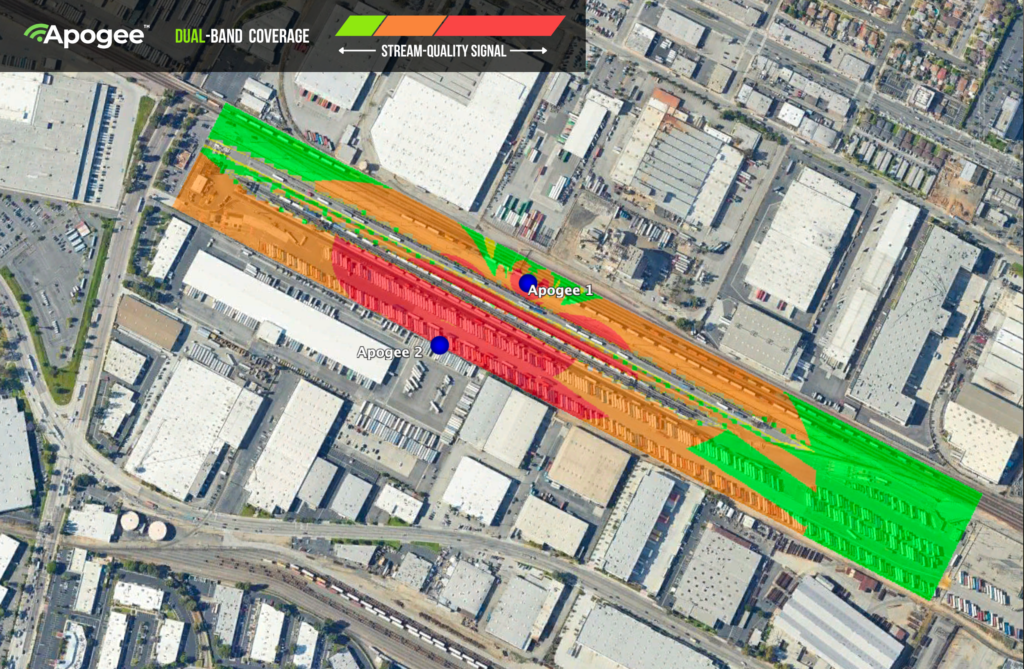
Improving rail yard Wi-Fi meant getting that connection out to the railcars, containers and equipment. Aura Wireless used two Apogee antennas to extend coverage across the yard, giving crews more freedom to scan inventory and use their devices where the work was happening.
When coverage gaps become part of the workday
Steel and a changing layout make an industrial yard a demanding place for Wi-Fi. Railcars, stacked containers and equipment can obstruct or reflect signals. Meanwhile, the people using handheld scanners and yard-management tablets keep moving.
At this site, the gaps affected several parts of the operation. Asset tracking depended on scanners staying connected. Drone teams needed a link for inspection and security work. Employees needed access to the tools used to manage and coordinate activity across the yard.
Walking back to a place with coverage gave a device another chance to connect. It also pulled someone away from the job they were there to do. The aim was to make more of the yard usable for everyday work.
How the rail yard Wi-Fi design used Apogee
Aura’s deployment used two Apogee antennas. The case illustrates why an outdoor wireless design needs to consider both directions of a connection: the network reaching a device, and that device sending a signal back.
That return path matters for low-power equipment such as handheld scanners. Apogee’s Asymmetric Gain helps the network receive those device signals over distance. Full Beamwidth Gain supports coverage across the antenna’s beam, while Hybrid Polarization helps address the reflected signals found around steel structures and equipment.
Steep Powered Filters reduce unwanted signals from outside the operating band. These capabilities serve a practical purpose. A useful coverage area is one where the devices doing the work can communicate, including as crews move between equipment and along the tracks. Antenna selection and placement need to account for that working environment.
What changed for crews in the yard
With the Apogee deployment, scanning could take place where the railcars were. Crews could log and locate containers across the yard instead of following fixed routes just to reconnect their devices.
The expanded outdoor Wi-Fi coverage also supported security drones and inspection video. Employees gained access to management and routing tools in areas where connections had previously been unreliable. For the people coordinating work, that meant more of the property was reachable through the network.
Those are the useful results of this story: a scanner that can be used at the asset, a connection available farther down the tracks, and fewer places where crews have to work around a coverage gap. The deployment achieved broader yard coverage with two Apogee antennas.
Planning industrial Wi-Fi around the actual site
For a team considering a similar project, this case offers a starting point. Identify where devices lose their connection and what work is affected. Include the routes crews follow, the equipment they carry and the places where inventory changes the signal path.
A site review can then connect those operational needs to the wireless design. Two antennas were used here; another property needs its own coverage plan based on its layout, devices and requirements.
Questions about rail yard Wi-Fi
Can Apogee support handheld scanners and asset tracking?
This deployment supported scanning and container tracking across the yard. For another site, the design should account for the scanners and tablets in use and the areas where crews need them to stay connected.
Do two Apogees mean every yard needs two antennas?
Antenna count is specific to the deployment. The location of steel structures, the property layout and the devices using the network all inform the design. This case demonstrates one site’s result.
Where should a coverage review start?
Start with the work: where scans fail, where devices reconnect and where crews need access to their tools. Aura’s RF modeling service can help turn a site plan and those requirements into an antenna placement plan.
For a closer look at the technology, explore how Apogee works and Aura’s outdoor wireless network solutions. To discuss your own yard, talk to the Aura Wireless team about RF modeling.